How to Check If Your Smart Meter Is SMETS1 or SMETS2 in the UK
Britain is about to spend around £4 billion replacing smart meters that depend on 2G and 3G mobile networks. Whether your meter needs a full replacement or just a small part swapped depends on one thing: whether it is a first generation SMETS1 meter or a second generation SMETS2 meter. Here is how to find out, in a few minutes, without touching any wiring.
SMETS1 and SMETS2 in plain English
SMETS stands for Smart Metering Equipment Technical Specifications. It is the technical standard your meter was built to, and there are two generations that matter for households.
SMETS1 meters are the first generation. They were fitted during the early years of the rollout, and they have their mobile connection built into the meter itself. In the early days, some SMETS1 meters also lost their smart functions when the household switched supplier, though many were later enrolled in the national data network.
SMETS2 meters are the second generation, and they started to arrive from late 2018. They connect through the national Data Communications Company network, so they keep working when you switch supplier. In central and southern Britain, a SMETS2 meter has a separate communications hub next to the meter. In the north, SMETS2 meters use a long range radio network instead.
Why does this matter now? The mobile networks are switching off 2G and 3G, with 2G due to close between 2029 and 2033. A SMETS1 meter will usually need a full replacement, because its connection cannot be removed. A SMETS2 meter will usually only need its hub swapped.
Method 1: Check when it was installed
The install date is the quickest and most reliable clue for most homes. If your smart meter was installed before late 2018, it is almost certainly a SMETS1 meter. The second generation rollout only began around that time. If your meter was installed in 2019 or later, it is almost certainly a SMETS2 meter.
Not sure when yours was fitted? Check your email for the booking confirmation and any paperwork the installer left behind. The installation date is often printed on the welcome letter or the handover sheet. If you moved in after the meter was fitted, move on to the next method.
Method 2: Look for the communications hub
Go and look at your meters. You do not need to open anything or touch any wiring. Just look at what is mounted on the wall next to them.
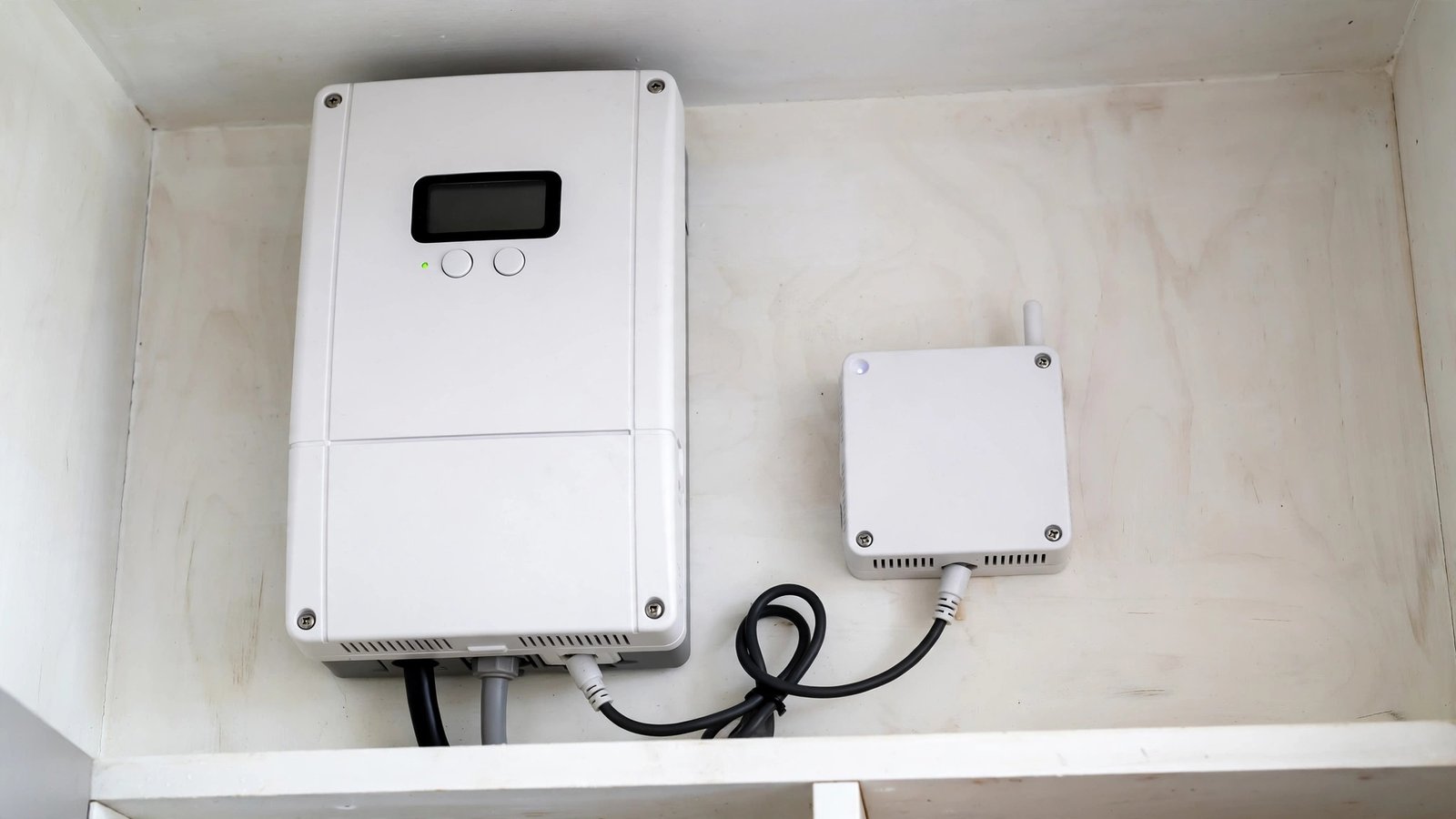
A SMETS2 meter in central or southern Britain usually has a separate communications hub. It is a small white box, roughly the size of a paperback book, mounted near the electricity meter. If you can see a separate hub box, you very likely have a SMETS2 meter. A SMETS1 meter usually has no separate hub.
Two warnings here. First, this check only works in central and southern Britain. In the north, SMETS2 meters use a long range radio network and may not have a hub box at all. Second, do not unscrew or open the meter or the hub. Looking is fine. Opening is a job for your supplier's engineer.
Method 3: Check your paperwork and display
Your installation paperwork can settle the question. The handover sheet or welcome pack from the installer often names the meter model. Search the paperwork for "SMETS1" or "SMETS2". Some suppliers also show the meter type on your online account, under the meter or usage pages.
Method 4: Ask your supplier
If the other methods leave you unsure, ask your supplier. This is the one method that gives a certain answer, and it costs nothing. Phone your supplier or use the live chat on their website or app, and ask whether your meter is SMETS1 or SMETS2. It helps to have your account number ready, and the meter serial number if you can read it from the label.
What to do if you have SMETS1
First, do nothing urgent. Your meter will keep working while 2G is still live, and the switch off is still several years away. Your supplier is expected to contact you when an upgrade is due in your area. Ofgem, the energy regulator, identifies 2026 to 2033 as the expected delivery period for upgrading older first generation meters.
Second, never pay a cold caller for a meter replacement. The upgrade is arranged by your supplier, and Smart Energy GB confirms there is no extra charge to customers. If someone knocks on your door offering to swap your meter for a fee, do not agree, and report it to your supplier.
Third, keep reading your meter yourself from time to time. If your SMETS1 meter ever stops sending readings, you can still read the numbers from the display and submit them to your supplier through their app or website. That keeps your bills accurate while you wait for an upgrade.
What to do if you have SMETS2
The news is better. If you are in the north of Britain, your meter uses the long range radio network and is not affected by the switch off. If you are in central or southern Britain, only the communications hub is likely to need swapping, and your supplier will arrange that.
There is still nothing you need to book. Keep your in-home display plugged in and the area around the meter and hub clear, so an engineer can reach them when a visit is due. If your display stops showing usage, contact your supplier.
Frequently Asked Questions
How can I tell SMETS1 from SMETS2 without any paperwork?
Use the install date first. Before late 2018 almost always means SMETS1, and 2019 onwards almost always means SMETS2. Then look for a separate white communications hub box next to the meter. If you are still unsure, your supplier can confirm the type.
Will my SMETS1 meter stop working when 2G switches off?
It will not stop measuring your energy use, but it may stop sending readings to your supplier. That means estimated bills until it is replaced. The 2G switch off is planned between 2029 and 2033, and your supplier is expected to contact you before then.
Does it cost anything to upgrade from SMETS1 to SMETS2?
No. Smart Energy GB confirms the move to newer equipment is arranged by your supplier at no extra charge. The wider cost of the national programme is expected to be recovered through energy bills over time, not charged as a separate fee.


Post Comment