How to Clean Your Phone’s Charging Port Safely in the US
If your charging cable keeps slipping out, or your phone only charges when you hold the cable at just the right angle, the problem might not be the cable at all. Pockets and bags push lint and dust into the charging port a little at a time, and after months of daily use that buildup can stop the plug from seating fully. The good news is that a careful clean often fixes it in a few minutes, and you can do it at home without special skills.
The trick is to be gentle. A charging port holds small metal contacts that carry power and data, and rough tools can bend them or push debris deeper. Work slowly, use soft tools, and stop if anything feels stuck. This guide covers iPhone and Android phones in the US, and the steps work for most recent models with a USB-C or Lightning port.
Before you start: power off and gather the right tools
Turn your phone fully off before you clean the port. This removes any chance of a short while you work, and it stops the phone from buzzing while you hold it steady. Unplug any cable, take the case off, and work in good light so you can see inside the port.
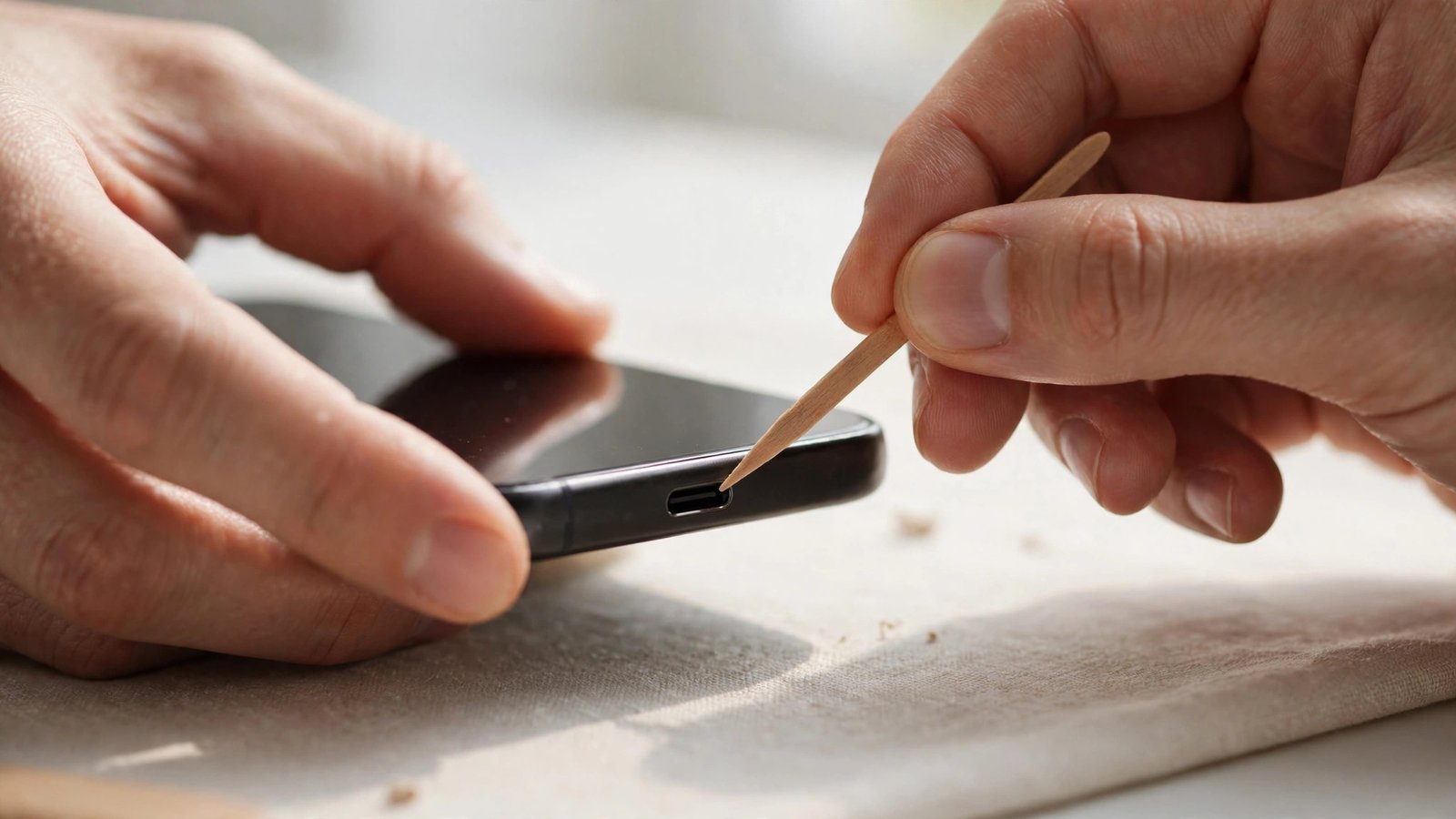
You need very little equipment. A bright flashlight or a desk lamp helps a lot, since ports are small and dark. A wooden or plastic toothpick, a soft plastic dental pick, or a small anti-static brush are good choices for lifting lint. A can of compressed air can help, but use short bursts from a few inches away and keep the can upright so no liquid comes out. A microfiber cloth is handy for wiping the outside of the phone when you finish.
Avoid metal tools. Paper clips, pins, needles, and SIM ejector tools can scratch contacts or bend pins, and metal can bridge connections inside the port. Avoid cotton swabs too, since loose fibers can add to the blockage. Avoid water, rubbing alcohol poured into the port, and strong vacuum suction, which can pull at small parts.
Step 1: Look inside the port with a light
Hold the phone with the port facing up and shine a light inside. You are looking for a grey or white mat of lint pressed against the back wall, or a ring of dust around the edges. On many phones the lint packs down so firmly that it looks like part of the port itself, which is why a cable stops clicking in fully.
Step 2: Loosen the lint gently
With the phone off, slide a wooden or plastic toothpick into the port along the flat side, away from the central tongue that holds the contacts. Use light, short strokes to lift the edge of the lint mat, working from one side to the other. Let the lint come out in small pieces rather than forcing one large clump free. Tap the phone gently, port facing down, every so often so loose debris falls out instead of settling back inside.
Step 3: Brush, blow out, and test the cable
Once the main lint is out, use a small soft brush to sweep the port lightly, or use short bursts of compressed air to clear fine dust. Hold the can upright, keep it a few inches from the port, and use one-second bursts with pauses in between. This stops moisture from building up and gives dust a chance to fall out instead of being driven deeper.
Wipe the outside of the phone with a microfiber cloth, and check the cable plug too. Lint and grime can build up on the plug itself, and a dirty plug will push debris straight back into a clean port. Wipe the plug gently with a dry cloth, and check for bent pins or a frayed cable. If the cable is damaged, replace it before you test the phone, since a bad cable can mimic a dirty port.
Turn the phone back on and plug in a cable you trust. It should slide in smoothly and sit flush, without wobbling. Charge for a few minutes and watch for a steady charging indicator. Try a second cable if the first still feels loose, since cables wear out and the plug can shrink slightly with use. Wireless charging, where your phone supports it, can keep you going while you arrange a repair, since it does not use the port at all.
When to stop and get professional help
Stop cleaning and seek help if you see bent or broken pins, corrosion, swelling, a cracked port, or any sign of liquid damage. Stop too if the phone gets hot while charging, if it smells unusual, or if the battery looks swollen. These are not cleaning problems, and continued use can make them worse. A repair shop can replace a charging port, usually for far less than a new phone, and many shops in the US offer same-day service for common models.
How to keep the port clean in the future
A few small habits keep lint from building up again. Carry your phone in a pocket without loose lint where possible, or use a case that does not shed fibers into the port. A simple port plug or dust cover, sold cheaply in the US, blocks pocket lint while still letting you charge by removing it first. Check the port every few months with a light, and clean it early when you notice a little buildup rather than waiting until the cable stops fitting.
Frequently Asked Questions
Can I use a paper clip to clean my charging port?
It is best not to. Metal tools can scratch contacts, bend pins, or cause a short inside the port. A wooden or plastic toothpick, a soft plastic pick, or a small soft brush lifts lint safely without risking the metal parts.
Is it safe to use compressed air in a phone charging port?
Yes, if you use it carefully. Keep the can upright, hold it a few inches away, and use short one-second bursts. Never shake the can or spray it upside down, since liquid propellant can come out and damage the phone.
How often should I clean my charging port?
Most people only need to check every few months, or when the cable starts feeling loose. If you carry your phone in a lint-filled pocket or work in a dusty setting, check monthly and clean at the first sign of buildup.




Post Comment